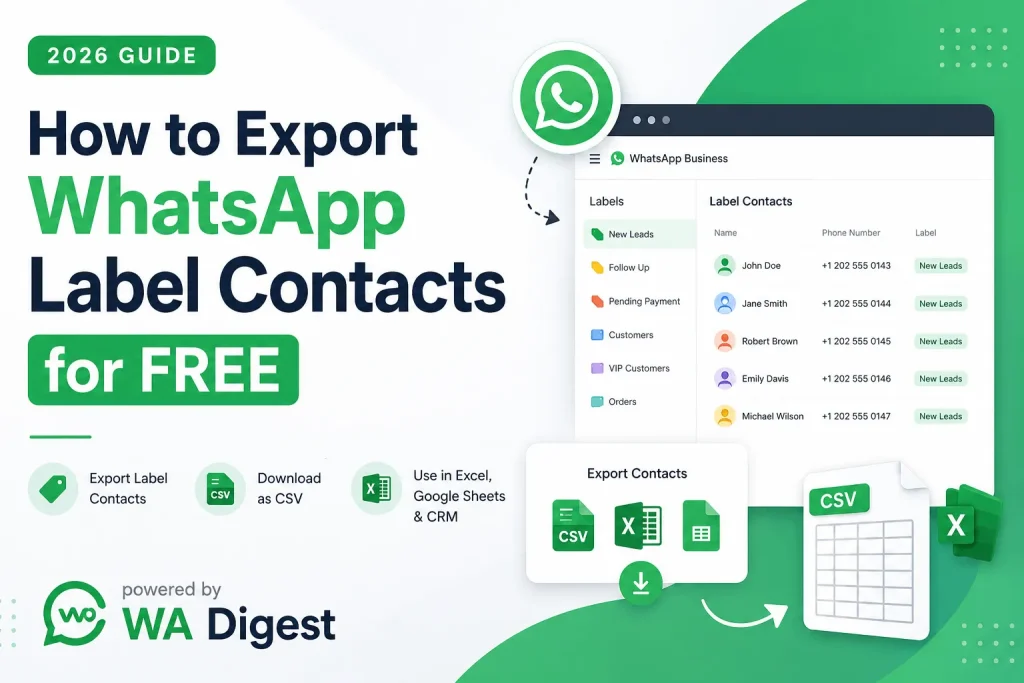
In this guide, we’ll explain how to export WhatsApp label contacts for free, how to download a WhatsApp Business label contact list, how to export WhatsApp contacts to CSV or Excel, and how to move exported contacts into Google Sheets or a CRM by using WASheet Extension.
If you use WhatsApp Business to manage customers, leads, prospects, or client conversations, you probably already know how useful WhatsApp Business Labels can be.
Labels help you organize conversations into categories such as:
- New Leads
- Follow Up
- Pending Payment
- Existing Customers
- VIP Customers
- Orders
- Completed Orders
- Support Requests
- Potential Clients
But there is one problem: WhatsApp does not provide a simple built-in option to export all contacts from a WhatsApp Business label into a CSV or Excel file.
Watch the below Youtube video to learn How to Export or Download WhatsApp Label Contacts to Excel:
That can become a major challenge when your business needs to create a customer database, organize leads, analyze contacts, import customer information into a CRM, or maintain a backup of business contacts.
Fortunately, there are tools that can make this process much easier.
One of the options available to WhatsApp Web and WhatsApp Business Web users is WASheet, a browser-based contact management and extraction tool designed to help users work with contacts from exporting WhatsApp chats, groups, labels, and other conversations.
We’ll also cover common questions about WhatsApp contact exporters, WhatsApp number savers, contact extractors, and contact downloader extensions.
What Are WhatsApp Business Labels?
Before learning how to export WhatsApp label contacts, it is important to understand what WhatsApp Business Labels actually do.
WhatsApp Business Labels are an organizational feature that allows businesses to categorize and manage customer conversations.
For example, an online store might create labels such as:
- New Customer
- New Order
- Payment Pending
- Payment Received
- Order Shipped
- Returning Customer
- High-Value Customer
- Follow Up Required
A sales team might use labels for:
- New Lead
- Qualified Lead
- Hot Lead
- Cold Lead
- Demo Requested
- Proposal Sent
- Deal Won
- Deal Lost
By assigning labels to conversations, businesses can quickly filter and manage customer conversations without manually searching through every chat.
However, if you want to download or export the contacts associated with a particular WhatsApp label, the standard WhatsApp interface may not provide the convenient CSV or Excel export workflow many businesses need.
This is where a dedicated WhatsApp label contact exporter can be useful.
How to Export WhatsApp Label Contacts for Free
If your goal is to export WhatsApp Business label contacts, you can use a tool such as WASheet to collect the contacts associated with your selected labels and download the information in a structured format.
The general process is straightforward.
Step 1: Open WhatsApp Web
Open WhatsApp Web in your desktop browser and sign in to the WhatsApp account you use for your business conversations.
Make sure the relevant WhatsApp Business account is connected and that your labels are available.
Step 2: Open WASheet
Open the WASheet browser extension or launch WASheet from your WhatsApp Web environment.
The tool is designed to provide additional contact management and export functionality directly within the WhatsApp Web workflow.
Step 3: Open “Contact Import + Check”
Look for the Contact Import + Check section.
Click the Open button to access the available contact tools.
Step 4: Select “Label Contacts”
Inside the WASheet panel, choose the Label Contacts option.
This feature is intended specifically for users who want to work with contacts organized under WhatsApp Business labels.
Step 5: Select Your WhatsApp Label
Choose the label you want to export from the available label list.
For example, you might select:
- New Leads
- Customers
- Follow Up
- VIP
- Pending Payment
The tool will process the contacts associated with the selected label.
Step 6: Download Your Contact List
Click Download to export the available contact information.
Depending on the available export options, the data can be saved in a structured format suitable for use with spreadsheets and customer management systems.
The exported information may include details such as:
- Contact name, when available
- Phone number
- Country code
- WhatsApp contact information
- Clean and structured contact data
Once exported, the contact list can be opened or imported into spreadsheet software and other business tools.
How to Export WhatsApp Label Contacts to CSV
CSV is one of the most useful formats for managing exported WhatsApp contacts.
A CSV (Comma-Separated Values) file can be opened in programs such as Microsoft Excel, Google Sheets, and many CRM platforms.
If you want to export WhatsApp label contacts to CSV, the workflow is generally:
WhatsApp Web → WASheet → Contact Import + Check → Open → Label Contacts → Select Label → Download
After downloading the CSV file, you can:
- Open it in Microsoft Excel
- Import it into Google Sheets
- Clean and organize the contact list
- Add additional business information
- Segment leads
- Create customer databases
- Prepare CRM imports
- Analyze customer lists
For businesses managing hundreds or thousands of WhatsApp conversations, exporting contacts to CSV can be significantly more efficient than manually copying phone numbers one by one.
How to Export WhatsApp Label Contacts to Excel
Many businesses prefer Microsoft Excel because it provides powerful tools for sorting, filtering, organizing, and analyzing customer data.
If your objective is to export WhatsApp Business contacts to Excel, you can download the contact data in CSV format and then open the file using Microsoft Excel.
The process is simple:
- Open WhatsApp Web.
- Launch WASheet.
- Open Contact Import + Check.
- Select Label Contacts.
- Choose the WhatsApp Business label you need.
- Download the contact list.
- Open the CSV file in Microsoft Excel.
You can then organize your spreadsheet into columns such as:
| Name | Phone Number | Country Code | Label | Status | Notes |
|---|---|---|---|---|---|
| Customer 1 | +1XXXXXXXXXX | +1 | New Lead | Follow Up | Interested |
| Customer 2 | +1XXXXXXXXXX | +1 | Customer | Active | Repeat Buyer |
This makes exported WhatsApp contacts easier to manage and integrate into your existing business processes.
Can You Export WhatsApp Contacts to Google Sheets?
Yes. If you have a CSV file containing your exported WhatsApp contacts, you can import it into Google Sheets.
This is particularly useful for remote teams and businesses that need multiple employees to access the same contact database.
A common workflow looks like this:
WhatsApp Business → WASheet → Export Contacts → CSV → Google Sheets
Once your CSV file is imported into Google Sheets, you can use it for:
- Lead management
- Customer segmentation
- Sales tracking
- Follow-up management
- Customer databases
- Marketing lists
- Team collaboration
- Reporting
- Data analysis
You can also add columns for information that may not be available in WhatsApp, including:
- Lead source
- Sales representative
- Last contacted date
- Follow-up date
- Customer type
- Purchase status
- Order value
- Notes
- Sales pipeline stage
This turns a basic WhatsApp contact export into a more organized business database.
What Is a WhatsApp Contact Exporter?
A WhatsApp contact exporter is a tool designed to help users collect and export contact information associated with WhatsApp conversations or other WhatsApp data sources.
Depending on the tool, it may support exporting contacts from:
- WhatsApp chats
- WhatsApp groups
- WhatsApp Business labels
- Customer conversations
- Broadcast-related contact lists
- Other accessible WhatsApp contact sources
Instead of manually opening individual conversations and copying phone numbers, an exporter can help streamline the process.
For businesses, this can save time when creating:
- Customer databases
- Sales lead lists
- CRM records
- Spreadsheet reports
- Contact directories
- Internal business records
WASheet is designed around this type of workflow, with contact extraction and export functionality for users working with WhatsApp Web.
What Is a WhatsApp Contact Extractor?
A WhatsApp contact extractor is a tool that helps users retrieve available contact information from WhatsApp-related sources.
The term can refer to different types of tools, including extensions and software that work with:
- WhatsApp chats
- WhatsApp groups
- WhatsApp Business labels
- Customer conversations
- Contact lists
The primary goal is to make contact collection more efficient.
For example, imagine a business has a WhatsApp Business label containing hundreds of customer conversations.
Without an export tool, the business may need to manually review chats and copy information one contact at a time.
A contact extraction tool can simplify the process by helping collect available contact data into a structured file.
This can be especially useful for sales teams, customer service departments, agencies, and small businesses that rely heavily on WhatsApp for customer communication.
How to Download a WhatsApp Business Label Contact List
If you are searching for how to download a WhatsApp label contact list, the process is relatively simple when using a compatible contact export tool.
With WASheet, the workflow is:
- Open WhatsApp Web.
- Open the WASheet extension.
- Go to Contact Import + Check.
- Click Open.
- Choose Label Contacts.
- Select the WhatsApp Business label you want to process.
- Download the resulting contact file.
This approach is useful for businesses that organize customer conversations using labels and want to create a separate list for each customer segment.
For example, you could maintain separate exports for:
- New Leads
- Qualified Leads
- Existing Customers
- VIP Customers
- Pending Orders
- Customer Support
- Follow-Up Customers
Each list can then be managed independently in a spreadsheet or CRM.
How to Export WhatsApp Contacts for CRM
Many companies use WhatsApp as part of their sales and customer support process, but their official customer database lives somewhere else.
This might be a CRM such as:
- HubSpot
- Salesforce
- Zoho CRM
- Airtable
- Other customer relationship management platforms
In these situations, a WhatsApp contact exporter can help businesses move contact data from their WhatsApp workflow into their broader customer management system.
A typical workflow is:
WhatsApp Business → Export Contact Data → CSV → Clean Data → Import to CRM
Before importing contacts into a CRM, it is good practice to review and organize the data.
You may want to:
- Remove duplicate contacts
- Standardize phone number formats
- Add country codes
- Verify contact information
- Add customer categories
- Map WhatsApp labels to CRM stages
- Add lead sources
- Assign contacts to team members
This can help create a cleaner customer database.
However, businesses should always follow applicable privacy laws, platform rules, and consent requirements when transferring or using customer contact information.
WhatsApp Contact Export for Sales Teams
Sales teams are among the groups that can benefit most from organized WhatsApp contact data.
Many sales representatives use WhatsApp to communicate with:
- Prospects
- Existing customers
- Leads
- Partners
- Distributors
- Vendors
Over time, these conversations can become difficult to manage.
WhatsApp Business Labels can help organize the conversations, while exporting the relevant contact data can make it easier to analyze and manage those customer segments outside WhatsApp.
For example, a sales manager could organize contacts into categories such as:
New Leads → Qualified Leads → Proposal Sent → Negotiation → Won
The team can then maintain a separate spreadsheet containing relevant information about each stage.
This creates a more structured approach to lead management.
WhatsApp Label Contacts for Customer Segmentation
One of the biggest advantages of exporting WhatsApp label contacts is the ability to work with customer segments outside the WhatsApp interface.
For example, an e-commerce company may have labels such as:
- First-Time Buyers
- Repeat Customers
- High-Value Customers
- Abandoned Orders
- Pending Payment
- Delivery Issues
Exporting these contact lists can make it easier to analyze different customer groups.
A marketing team might use the exported data to understand:
- How many contacts are in each segment
- Which customer groups require follow-up
- Which leads are still active
- Which conversations need attention
The exported data can then be combined with other business information to create a more complete customer management workflow.
WhatsApp Number Saver vs. WhatsApp Contact Exporter
You may also come across terms such as WhatsApp number saver, WhatsApp contact saver, and WhatsApp contact downloader.
Although these terms are sometimes used interchangeably, they can describe slightly different use cases.
WhatsApp Number Saver
A WhatsApp number saver generally refers to a tool that helps users save or collect WhatsApp phone numbers for later use.
WhatsApp Contact Exporter
A contact exporter focuses on moving contact information from WhatsApp into an external format such as CSV or Excel.
WhatsApp Contact Extractor
A contact extractor generally focuses on collecting available contact information from a specific WhatsApp source.
WhatsApp Contact Downloader
A contact downloader typically refers to the ability to retrieve contact data and save it as a downloadable file.
In practice, a single tool may offer several of these capabilities.
WASheet, for example, is positioned as an all-in-one solution for users who want to work with contact data from WhatsApp Web, including contacts associated with chats, groups, and WhatsApp Business labels.
How to Export Contacts from WhatsApp Groups
WhatsApp Business labels are not the only source of contact data that businesses may want to organize.
Some businesses also manage communities, groups, and customer discussion groups.
If you need to work with contacts associated with WhatsApp groups, a compatible contact export tool may provide an option to collect available contact information and download it into a structured format.
The general workflow is similar:
Open WhatsApp Web → Open WASheet → Contact Import + Check → Choose the relevant contact source → Export
Depending on the tool and the WhatsApp environment, available options may include chats, groups, or labels.
Always make sure that your use of exported contact information complies with applicable privacy regulations and the consent expectations of the people whose data you are handling.
How to Export WhatsApp Chat Contacts
Businesses often have valuable customer information spread across individual WhatsApp conversations.
A WhatsApp chat contact exporter can help organize contact information associated with those conversations.
This can be useful when:
- Building a lead database
- Creating a customer list
- Organizing sales prospects
- Moving contact data into a CRM
- Preparing internal reports
Instead of manually copying each number, a contact export workflow can help reduce repetitive data entry.
For businesses that receive a high volume of WhatsApp inquiries every day, this can save considerable administrative time.
Why Businesses Export WhatsApp Contacts
There are many reasons why a company might want to export WhatsApp contacts.
1. CRM Management
Businesses may want to transfer customer contact information into a CRM platform.
2. Lead Management
Sales teams can organize leads and prospects in a spreadsheet or sales pipeline.
3. Customer Segmentation
WhatsApp Business Labels can be used as categories for customer groups.
4. Data Organization
Exported contacts can be cleaned, sorted, filtered, and categorized.
5. Business Reporting
Teams can analyze customer lists and create internal reports.
6. Team Collaboration
CSV files and Google Sheets make it easier for authorized team members to collaborate.
7. Contact Backup
Businesses may want to maintain organized business records outside of the WhatsApp interface.
The best workflow depends on the company’s requirements, data policies, and privacy obligations.
Why WASheet Can Be Useful for WhatsApp Contact Export
There are many reasons users search for tools that can export WhatsApp Business contacts.
The biggest reason is convenience.
Manually collecting hundreds of phone numbers can be tedious and time-consuming. A dedicated tool can help reduce repetitive work by providing a structured export process.
WASheet is designed to support multiple WhatsApp contact workflows, including:
- WhatsApp Business label contact export
- WhatsApp chat contact extraction
- WhatsApp group contact extraction
- Contact list management
- CSV export
- Spreadsheet workflows
For users who regularly work with WhatsApp Web for sales, support, or customer management, having these functions available in one workflow can be more convenient than manually copying individual contact details.
Is WASheet Free?
Users looking for a free WhatsApp label contact exporter often want to know whether they can export their contacts without paying for expensive software.
WASheet promotes a free way to export WhatsApp label contacts and provides tools for working with contact data through WhatsApp Web.
However, users should check the current WASheet website or extension listing for the latest information about available free features, usage limits, and any premium functionality, as software features and pricing can change over time.
Is WhatsApp Contact Exporting Safe?
Safety and privacy are important considerations whenever you work with customer information.
Before using any WhatsApp contact exporter, businesses should understand:
- What data the tool accesses
- Where data is processed
- Whether data is stored externally
- What permissions a browser extension requires
- How exported data is handled
- Whether the workflow complies with applicable privacy requirements
WASheet states that its contact extraction workflow is designed with privacy in mind and that user data is not stored externally.
Even so, businesses should always review the tool’s current privacy policy and terms before using it with sensitive customer information.
It is also important to remember that exporting contact information does not automatically give a business permission to use that data for marketing.
Always comply with applicable data protection laws and WhatsApp’s policies when handling customer information.
WhatsApp Label Contact Exporter: Frequently Asked Questions
Can I export WhatsApp Business label contacts?
Yes. A compatible WhatsApp contact export tool can help you collect and download contact information associated with WhatsApp Business labels.
WASheet provides a Label Contacts workflow designed for this purpose.
How do I export WhatsApp label contacts to CSV?
Open WhatsApp Web, launch WASheet, open Contact Import + Check, select Label Contacts, choose your label, and download the available contact data as a CSV file.
How can I export WhatsApp contacts to Excel?
You can download the contact list as a CSV file and open it in Microsoft Excel. CSV is widely supported and can be converted or saved into an Excel-compatible format.
Can I export WhatsApp contacts to Google Sheets?
Yes. You can upload a CSV file containing exported WhatsApp contacts into Google Sheets.
This makes it possible to organize, filter, and collaborate on contact data with your team.
What is the best WhatsApp label contact exporter?
The right tool depends on your specific requirements, including the number of contacts, export formats, privacy requirements, and the WhatsApp environment you use.
For users looking specifically for a tool that supports WhatsApp Business label contact exports, WASheet is one option to consider.
How do I download a WhatsApp Business label contact list?
Use a compatible contact export workflow:
WASheet → Contact Import + Check → Open → Label Contacts → Select Label → Download
The exported file can then be opened in spreadsheet applications or imported into compatible business systems.
Can I export WhatsApp group contacts?
Some WhatsApp contact extraction tools support group contact exports in addition to label and chat contact extraction.
The available functionality can depend on the tool and its current version.
What is a WhatsApp number saver?
A WhatsApp number saver is a tool that helps users save or collect WhatsApp phone numbers for later organization or management.
Some tools also provide export capabilities, allowing users to download the collected contact information.
What is a WhatsApp contact downloader?
A WhatsApp contact downloader is generally a tool that helps users retrieve available WhatsApp contact information and save it to a downloadable file such as CSV.
Can I import exported WhatsApp contacts into a CRM?
Yes, depending on the CRM platform. Many CRM systems support CSV imports.
You may need to clean and format your data before importing it.
Can I export WhatsApp contacts without manually copying numbers?
A dedicated WhatsApp contact exporter can reduce or eliminate the need to manually copy individual numbers, depending on the data source and tool capabilities.
This is one of the primary reasons businesses use contact extraction and export tools.
Does WhatsApp have a built-in feature to export all label contacts?
WhatsApp Business provides labels for organizing conversations, but users looking for a dedicated CSV or Excel export workflow may need an additional solution.
Best Practices When Exporting WhatsApp Contacts
If you plan to export WhatsApp Business contacts for business use, consider following these best practices.
Keep Your Data Organized
Use clear labels and consistent naming conventions.
For example:
- Lead – New
- Lead – Qualified
- Customer – Active
- Customer – VIP
- Follow Up – Today
This makes your exported data easier to understand.
Remove Duplicates
Before importing contacts into a CRM or spreadsheet, check for duplicate phone numbers.
Standardize Phone Numbers
Use consistent international phone number formats where possible.
Protect Customer Data
Store exported files securely and limit access to authorized employees.
Respect Privacy
Only use customer information for legitimate and permitted purposes.
Maintain Data Accuracy
Regularly review exported lists and remove outdated or incorrect information.
A clean contact database is much more useful than a large but unorganized collection of numbers.
WhatsApp Label Contact Export: The Easier Way to Manage Customer Data
WhatsApp has become an essential communication channel for businesses around the world.
For small businesses, online stores, sales teams, agencies, and customer support departments, WhatsApp Business can become the center of daily customer communication.
But as the number of conversations grows, managing those contacts manually becomes increasingly difficult.
WhatsApp Business Labels solve part of this problem by helping businesses organize conversations into meaningful categories.
The next challenge is getting that organized information into a format that can be used outside WhatsApp.
That’s where a WhatsApp label contact exporter can help.
With a workflow such as:
WhatsApp Business → WASheet → Label Contacts → Export → CSV/Spreadsheet
businesses can create structured contact lists that are easier to analyze, manage, and integrate into their broader customer workflows.
Whether you are searching for:
- How to export WhatsApp label contacts
- How to download WhatsApp Business label contacts
- How to export WhatsApp contacts to CSV
- How to export WhatsApp contacts to Excel
- How to export WhatsApp contacts to Google Sheets
- WhatsApp label contact exporter
- WhatsApp contact extractor
- WhatsApp contact downloader
- WhatsApp number saver
- WhatsApp contact saver
- WhatsApp group contact exporter
- WhatsApp chat contact exporter
- WhatsApp contacts for CRM
the basic goal is the same: turn scattered WhatsApp contact information into structured, manageable business data.
Final Verdict: Is WASheet Worth Trying for WhatsApp Label Contact Export?
If you regularly use WhatsApp Business Labels to organize customers and leads, manually copying contact information can quickly become a frustrating task.
A dedicated contact export tool can make the process more efficient by helping you collect and organize available contact data in a structured format.
WASheet is built around this use case, offering contact workflows for WhatsApp Web users who want to work with contacts from WhatsApp Business Labels, chats, and groups.
Also Read: How to Add Multiple Contacts in WhatsApp Group at Once
Its label contact workflow is particularly useful for businesses that want to move from:
WhatsApp Labels → Organized Contact Lists → CSV/Excel → Google Sheets or CRM
For sales teams, marketers, customer support professionals, agencies, and business owners, this can provide a more efficient way to manage customer contact information.
If your goal is to export WhatsApp label contacts for free, download a WhatsApp Business label contact list, or organize WhatsApp contacts for spreadsheets and CRM systems, WASheet is a tool worth exploring.
As always, businesses should handle exported customer information responsibly, respect applicable privacy laws, and follow WhatsApp’s terms and policies.
For anyone searching for a practical way to export WhatsApp Business label contacts in 2026, the combination of WhatsApp Business Labels and a dedicated tool such as WASheet can provide a straightforward starting point for building a more organized customer data workflow.